Modules
The core functionality of SVD is the simulation of state transitions by the means of a Deep Neural Network. In addition, SVD can be extended with “modules”. Modules can be used to:
- extend the range of vegetation types covered by SVD; for instance, if the DNN only covers forest states, a module could handle other land cover types (e.g. grass land or agricultural land)
- implement additional processes such as disturbances or forest management; the DNN could be used for “slow” forest dynamics, while abrupt changes (e.g. wildfire) are imposed by modules
- implement parts of the life cycle that are not covered by the DNN; for example, if a DNN is only trained to estimate regeneration probabilities after a disturbance, a module can be used to establish a simplified model of vegetation dynamics for other development stages.
Interaction types
SVD provides two conceptually different ways how modules can interact with the landscape. Modules can either fully handle specific states (i.e. calculate vegetation transitions for all cells in these states), or affect cells in states that are normally handled by a different process / module. The following figure depicts the difference:
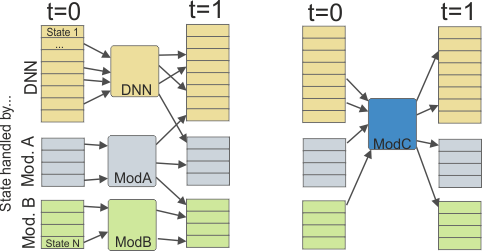
Left: different states are handled by different modules (DNN, Module A, Module B), right: a module (Module C) affects cells that are handled by a different process / module.
In the figure, “Module A” and “Module B” are assigned to handle specific states (blue and green). Note that only the input of a module is limited to cells with specific states (blue and green). For instance, cells that are handled by “Module A” (that are currently in a blue state), can transition to “Module B” (green) or to the main DNN (orange). If, say, the DNN handles forest and “Module A” grass land, then the reforestation of a cell would be a transition from a blue to an orange state, and consequently the DNN would handle the cell in the future. Note also, that the modules could be totally separated with no transitions between different modules.
“Module C” is different (right part of the figure): when the module is executed, it can affect different cells (orange, green, or blue states) and change their states. Such a module typically represents some kind of intervention process, such as disturbances or forest management. Note that a state transition caused by the module can also affect the handling module; for example, a fire module could change a forested state that is handled by the DNN (orange) to a grass land state (blue).
Supported modules
Modules are configured in the project file. The specific implementation of a module is chosen with the type setting. The following modules are available:
matrixState-specific transitions based on a transition probability matrix.fireWildfire disturbance module that simulates pre-defined events.windWind disturbance module that simulates pre-defined events.bark beetleBark beetle disturbance module that simulates spruce bark beetle dynamics.managementManagement module that simulates pre-defined events.
Specifying handling modules for states
To set the module as handler for specific states, use the module name as the type property in the state definition.
For example, consider the following definition of a module test_matrix:
modules.test_matrix.enabled = true
modules.test_matrix.type = matrix
modules.test_matrix.transitionFile = stm/stm.trans.csv
modules.test_matrix.keyFormula = min(residenceTime/10, 10)
To specify that (for example) the states 1 and 2 are handled by test_matrix while all other states are handled by the DNN, update the type column in the state input file (note that a blank type defaults to DNN):
| stateId | type | (other columns) |
|---|---|---|
| 1 | test_matrix | … |
| 2 | test_matrix | … |
| 3 | …. | |
| … | … | …. |