Configuring the DNN
SVD integrates ONNX Runtime and allows thus to run any trained Deep Neural Network (in .onnx format) within the framework. A conceptual view is depicted below:
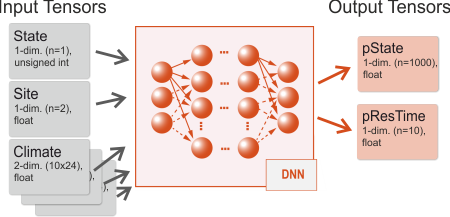
The network architecture of the DNN defines not only the layers of the network, but also the shapes and types of the input and output data. SVD adopts a “multiple-inputs/multiple-outputs” model, where a single network is trained to be fed simultaneously with data from multiple inputs, and provides multiple outputs as result. Typical inputs are the current state and residence time of a cell, climate and site conditions, typical outputs are a probability distribution for the next state S*, and a distribution for the time until state change.
Each of this inputs and outputs is (in Deep Learning lingo) a tensor, i.e. a multidimensional array of data with a given shape (the number of dimensions and the size along each axis of the tensor) and type (the internal data type of the tensor, for example floating point or integer). The input/output data needs to comply with the definition of the tensors both during the training and inference phase.
In order to integrate (an existing) DNN with SVD one needs to:
- define each input tensor (name, shape, data type)
- define which data items should be fed into the tensors during a SVD simulation
- further define potential transformation of those data items (often data is scaled or otherwise transformed for better DNN performance)
Input tensors
SVD includes a flexible mechanism to define input tensors and provides several pre-defined and user defined input “slots”. The input tensors are defined in a configuration file which is set by the dnn.metadata setting.
Here is an example of a pre-defined slot:
# defines the tensor "climate" with data type "float"
# and 2 dimensions (10 years x 24 values per year).
# The slot is "Climate"
input.climate.enabled=true
input.climate.dim=2
input.climate.sizeX=10
input.climate.sizeY=24
input.climate.dtype=float
input.climate.type=Climate
SVD detects the pre-defined type Climate and sets up a link to the available climate data in the model. The name of the tensor is climate (as in input.climate), and the data is a 2-dimensional matrix with 10x24 values. For each cell that should be processed by the DNN SVD populates the tensor with climate data for the next 10 years (in this case the time series consists of 24 values per year).
Another example with user defined input data:
# defines the tensor "site" with data type "float"
# and 1 dimension (2 values)
# The type is "Var"
input.site.enabled=true
input.site.dim=1
input.site.sizeX=2
input.site.sizeY=0
input.site.dtype=float
input.site.type=Var
input.site.transformations={availableNitrogen/100}, {pctSand/100}
In this case SVD fills for each cell the two variables in the input tensor with availableNitrogen/100 and pctSand/100. availableNitrogen and pctSand need to be available in the model (e.g. provided as environment variables in landscape.file). Note that the data values are transformed on the fly. The name of the tensor is site.
A more detailed description of the available input slots is given on the DNN metadata page.
Output Tensors & Top-K Modes
SVD expects two main output targets from the DNN:
- State Prediction: Candidate future states and their probabilities (Top-K states).
- Residence Time: A probability distribution for the time until state change (typically the result of a
Softmaxlayer specified viadnn.restime.nameanddnn.restime.N).
For state prediction, SVD supports two execution modes for Top-K extraction:
Mode 1: CPU Top-K Mode (dnn.state.name)
In CPU mode, the ONNX model outputs the full probability distribution over all possible state classes (typically a Softmax layer of shape [batch, num_states]).
Configuration:
dnn.state.name = output_state # Tensor name for full state probability distribution dnn.state.N = 1418 # Total number of state classes dnn.topK.N = 10 # Number of top candidate states to extractExecution: SVD extracts and filters the
dnn.topK.Nmost likely candidate states on the CPU.DNN Training & Setup: Standard model training and export without modifying the network output layers. Recommended for quick testing with existing models.
Mode 2: GPU Top-K Mode (dnn.topK.state.name and dnn.topK.prob.name) — Recommended for High Performance
In GPU mode, the Top-K selection operator is embedded directly inside the ONNX model graph (via an ONNX TopK node). The GPU computes the Top-K candidate states in CUDA VRAM during inference and outputs two compact tensors: Top-K state IDs and Top-K probabilities.
Configuration:
dnn.topK.state.name = State_TopK:1 # Tensor name for Top-K state IDs (INT16, INT32, INT64, or FLOAT) dnn.topK.prob.name = State_TopK:0 # Tensor name for Top-K probabilities (FLOAT) dnn.topK.N = 10 # Number of top candidate states returned by GPUExecution: SVD reads Top-K results directly from GPU memory with zero CPU sorting overhead and 99% reduced PCIe data transfer (achieving throughput over 450,000 cells/sec).
DNN Training & Setup:
- Training: Train your neural network model as usual with standard Softmax / Cross-Entropy loss.
- Model Export: Before exporting to
.onnx, append aTopK(k=10)operator (e.g.tf.nn.top_kin TensorFlow,torch.topkin PyTorch, or via theonnxPython helper) to the state output layer. - SVD Setup: Configure
dnn.topK.state.nameanddnn.topK.prob.namein your project file.